NotionApps vs Super.so: Which Is Better for Turning Your Notion into a Website or App?
A detailed comparison of NotionApps and Super.so to help you choose the right platform for turning your Notion workspace into a website or an interactive app.
Jan 13, 2026
Notion has quietly evolved from a personal workspace into a powerful backend for websites, tools, and lightweight apps. As more people start using Notion to publish content or run workflows, the next question becomes obvious: how do you turn Notion into something others can actually use?
That’s where tools like NotionApps and Super.so come in. Both let you extend Notion beyond its native interface, but they approach the problem from very different angles. Understanding those differences is key to choosing the right tool for your use case.
Notion has evolved far beyond simple note taking. It is now the infrastructure behind real, working products. We see teams using it to run websites, internal tools, and client portals.
But there is a limitation. While Notion is powerful for the person building the system, it is often overwhelming for the person using it. Sharing a raw database link with a client or a customer is rarely the best experience. It looks and feels like a spreadsheet, not a professional product.
This is why tools like NotionApps and Super.so exist.
They both allow you to build a polished interface on top of your Notion data, but they solve different problems. One is designed to create interactive apps. The other is built to publish fast, beautiful websites. Understanding this difference is the first step to choosing the right tool for your project.
What Each Tool Is Built For
Before comparing features, it is important to understand what each tool is fundamentally designed to do. NotionApps and Super.so solve different problems. That intent shows up clearly in how they are used.
Super.so: Turning Notion into a Website
Super.so is built with publishing in mind. Its core goal is to take Notion pages and turn them into fast, professional websites with minimal effort.
It is the right choice if:
Your content is mostly text and images.
You are building blogs, documentation, or marketing sites.
SEO, speed, and design consistency are priorities.
Your users are primarily there to read, not to interact.
Super focuses on presentation. You write in Notion, publish with Super, and get a clean website that loads quickly and looks consistent.
NotionApps: Turning Notion into Usable Apps
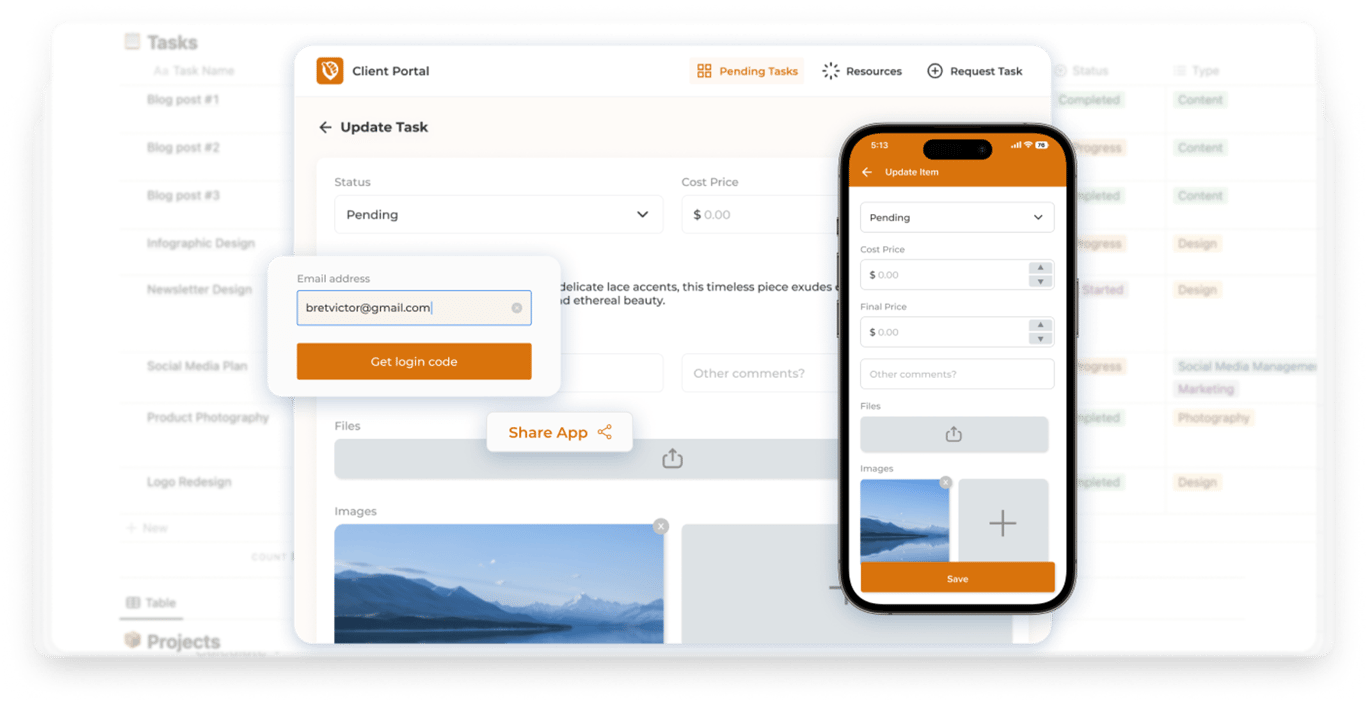
NotionApps approaches the problem from a different angle. Instead of treating Notion as content to publish, it treats Notion databases as systems to interact with.
It is designed for:
Workflows built around databases.
Tools that require filtering, sorting, and user actions.
Internal apps, dashboards, and client portals.
Situations where users need to take action, not just read.
NotionApps does not just publish pages. It helps you design screens and interfaces that sit on top of your Notion data. This makes it easier for users to interact with your system without ever touching the raw database.
Website Building Experience: Pages vs Screens
The way a tool structures your Notion content has a big impact on how people experience what you build. This is where the difference between Super.so and NotionApps becomes very clear.
Super.so follows a page-first model. Each Notion page becomes a web page, and navigation is mostly about moving between those pages. This works especially well when your goal is to present information clearly and consistently. Blogs, documentation sites, landing pages, and knowledge bases fit naturally into this structure because users are primarily consuming content rather than interacting with it.
NotionApps, on the other hand, is built around screens instead of pages. Screens are designed with user actions in mind. Rather than exposing raw pages or databases, you define what a user sees, how they move between views, and what actions they can take. This makes a big difference when your Notion setup is database-heavy or workflow-driven.
The practical impact shows up quickly. In a page-based setup, users often have to understand your underlying structure to navigate effectively. In a screen-based setup, users are guided through a clearer flow. They don’t need to know where data lives in Notion or how databases are connected; they just interact with what’s in front of them.
This distinction matters most when your Notion workspace grows beyond static content. As soon as users need to filter data, update records, submit information, or focus on specific tasks, a screen-based approach tends to feel more intentional and easier to use. It shifts the experience from “browsing a site” to “using a tool,” even though everything is still powered by Notion in the background.
Data, Databases, and Interactivity
Once you move beyond static pages, the way a tool handles data becomes critical. This is where the differences between Super.so and NotionApps start to shape what you can realistically build.
Super.so treats Notion databases primarily as content to display. You can publish tables, lists, and collections as part of a website, which works well when databases are being used to power things like blog indexes, documentation libraries, or simple directories. The interaction model is largely read-only. Users browse, scroll, and navigate, but they aren’t expected to actively work with the data.
NotionApps approaches databases as living systems. Instead of exposing the database itself, it lets you design interactive views on top of it. Users can filter records, sort entries, submit information through forms, and interact with data without ever seeing the underlying structure in Notion.
This difference matters as soon as your use case involves action rather than consumption. A task tracker, CRM, booking system, or internal dashboard quickly feels limited when users can only view data. When users need to update statuses, narrow down information, or focus on what’s relevant to them, interactivity becomes essential.
In practice, this means database-heavy setups feel more intentional when they’re treated as systems rather than pages. The data still lives in Notion, but the experience becomes more guided and purpose-built. Users don’t have to understand how your databases are structured; they just interact with what they need.
As workflows grow more complex, this shift from “showing data” to “working with data” often defines whether a Notion-powered build feels like a website or like an actual app.
Customization, Control, and Real-World Use Cases
Customization isn’t just about how something looks. It’s about how much control you have over how users interact with your Notion-powered setup, and how well that setup adapts as requirements change.
Super.so gives you strong control over presentation. You can customize themes, layouts, fonts, and navigation to create a polished, consistent website. This works especially well for public-facing content like blogs, help docs, landing pages, and marketing sites, where the primary goal is clarity and visual coherence. The structure is predictable, and that’s often a good thing when users are there to read and move on.
NotionApps focuses more on functional control. Instead of styling pages, you shape how data is exposed and how users move through it. Screens can be tailored to show only relevant fields, actions, or views depending on the context. This becomes important in setups where different users need different experiences, even though the data lives in the same place.
The difference shows up clearly in common use cases. A blog or documentation site benefits from a design-first approach, where content hierarchy and readability matter most. A client portal, internal tool, or operations dashboard benefits from a workflow-first approach, where users need to filter information, take actions, and focus on specific tasks without friction.
As Notion setups grow, this distinction becomes more noticeable. Content-focused builds tend to stabilize once published. Workflow-driven builds tend to evolve. New fields get added, processes change, and user needs shift. Tools that prioritize functional flexibility often adapt more smoothly in those situations, without forcing a redesign or rebuild.
Choosing between these approaches isn’t about which tool is better overall. It’s about whether your Notion workspace is primarily telling a story or running a system.
Performance, Maintenance, and Scaling Over Time
How a Notion setup performs on day one is irrelevant. What matters is how it holds up six months later. This is where the differences between these tools become obvious as your content grows and your workflows evolve.
Super.so: Predictability and Speed
Super is optimized for publishing stability. Because it converts Notion pages into static websites, performance remains consistent regardless of traffic. Maintenance is straightforward. You edit the page in Notion, and the site updates. This model is ideal for projects where the structure is fixed and changes are mostly textual.
NotionApps: Adaptability and Logic
NotionApps is designed for active usage. As your databases expand and your workflows become more complex, the priority shifts from raw speed to usability. You can adjust screens, add new views, and refine user flows without touching the underlying data. This makes it far easier to adapt when your operational requirements change.
The Reality of Maintenance
The maintenance burden differs significantly between the two. In a page-based setup, updates are content edits. In a system-based setup, updates involve logic, filters, and permissions. The tool you choose dictates how much friction you face when making these changes.
As you scale, the most important metric is adaptability. When a system begins serving multiple users and roles, the ability to evolve without tearing everything down is the difference between a tool that supports your business and one that slows it down.
Final Thoughts: Choosing the Right Tool for Your Goal
Both NotionApps and Super.so extend Notion effectively. However, they are tools for fundamentally different jobs.
If your goal is to publish content, such as blogs, documentation, or marketing sites, the page-first approach is the correct choice. It is optimized for reading. It works best when your users are there to consume information.
However, when Notion serves as the engine for your workflows, the requirements change. If users need to filter data, update records, or manage tasks, a website is not enough. You need an interface designed for action. In this context, navigation and clarity matter far more than just presentation.
This is where the distinction is sharpest. One approach displays content. The other powers interaction.
The decision does not need to be complex. It comes down to a single question. Is your Notion setup meant to be read, or is it meant to be used? Once you answer that, the right choice becomes obvious.
.gif)